!!! coin exp infini for games !!!'s Fan Box

Affichage des articles dont le libellé est Pet Society. Afficher tous les articles

mardi 27 avril 2010

Pet Society // Petling Cheat

Database edited by: joojoobe@pwnthis

  •  fiddler2
  • preferred browser
  • petling database [ link 1 | link 2 ]
Steps:
  1. Log into your Pet Society
  2. Download the wig file above.
  3. Open Fiddler.
  4. Go into Pet Society. Once loaded, find for this line in Fiddler.
    http://d2syub29v5lge2.cloudfront.net/game/pets/swf/xxx/database.dat
  5. Right click them > Copy URL and go to Autoresponder and click ‘Add’. Or you can use this regular expression. regex:(?insx).*database\.dat$
  6. Now replace the database.dat with the joojoobe_CashPetlingsWigdyes.dat that you just downloaded. Click SAVE
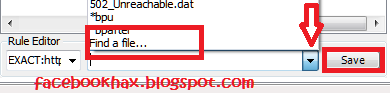
    (Click on the drop down arrow button beside the ‘Save’. Select ‘Go To File’ and browse to the place where you downloaded the file to.)
  7. Clear cache for your browser.
  8. Clear cache for your browser! i cannot emphasize this enough. Go into Pet Society.
  9. Check that joojoobe database is loaded first by going to the Food Shop and buying the Petling Growth potion. It should be only 5 yellow coins. If database is loaded correctly, you can now go to the Garden Shop.
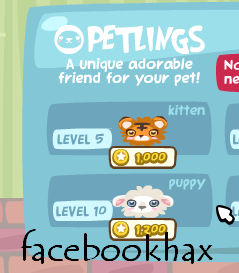
    - Buy a Kitten if you want a Tiger (kitten will only grow into a Tiger after the growth potion)
    – Buy a Puppy if you want a Lamb (pupply will only grow into a Lamb after the growth potion)
  10. You can also get your Pink Tepee and Totem pole from the Garden shop. As usual, you have to ‘Send As Gift’ 
Note: Rescue all your petlings before using cheat as you cannot pay them out when cheat is activated. 

Pet Society // Wig Dye Database by nofil2000

Credits: nofil2000
  •  Fiddler2
  • preferred browser
  • nofil2000 wig database [ link 1 | link 2]
Steps:
  1. Log into your Pet Society
  2. Download the wig file above.
  3. Open Fiddler
  4. Go into Pet Society. Once loaded, find for this line in Fiddler.
    http://d2syub29v5lge2.cloudfront.net/game/pets/swf/xxx/database.dat
  5. Right click them > Copy URL and go to Autoresponder and click ‘Add’. Or you can use the regular expression that I used in all my videos.  regex:(?insx)^http://d2syub29v5lge2\.cloudfront\.net/game/pets/swf/.*/database\.dat$
  6. Now replace the database.dat with the wig_database.dat that you just downloaded. Click SAVE
    (Click on the drop down arrow button beside the ‘Save’. Select ‘Go To File’ and browse to the place where you downloaded the file to.)
  7. Clear cache for your browser.
  8. Clear cache for your browser! i cannot emphasize this enough. Go into Pet Society.
  9. Go into the Boutique and you scroll to the dyes. Click on them and you should see it costing only 5 YELLOW COINS. Click it and ignore the message about Playfish Cash as it will still deduct from your yellow coins. [Warning: Make sure you do it correctly or it WILL deduct your blue coins. It should not as long as you see the price tag in yellow coins. This database has PETLINGS dyes too. Tested and working as shown in my screenshots. 5 yellow coins deducted !

Pet Society // Seperate Databases

Credits: Omay32@foro-trucotron27.com
Steps:
  1. Log into your Secondary Account. 
  2. Download the file above.
  3. Open Fiddler
  4. Go into Pet Society. Once loaded, find for this line in Fiddler.
    http://d2syub29v5lge2.cloudfront.net/game/pets/swf/xxx/database.dat
  5. Right click them > Copy URL and go to Autoresponder and click ‘Add’. Or you can use the regular expression that I used in all my videos.  regex:(?insx)^http://d2syub29v5lge2\.cloudfront\.net/game/pets/swf/.*/database\.dat$
  6. Now replace the database.dat with the rosie_database.dat that you just downloaded. Click SAVE
    (Click on the drop down arrow button beside the ‘Save’. Select ‘Go To File’ and browse to the place where you downloaded the file to.)
  7. Find for this line in Fiddler.
    http://d2syub29v5lge2.cloudfront.net/game/pets/swf/x.xxx/shops/shopMysteryXXXX.dat
  8. Right click them > Copy URL and go to Autoresponder and click ‘Add’. Or you can use the regular expression that I used in all my videos.  regex:(?insx)^http://d2syub29v5lge2\.cloudfront\.net/game/pets/swf/.*/shops/shopMystery.*\.dat$
  9. Now replace the shopMystery.dat with the shopMystery.dat that you just downloaded. Click SAVE.
    (Click on the drop down arrow button beside the ‘Save’. Select ‘Go To File’ and browse to the place where you downloaded the file to.)
  10. Clear cache for your browser.
  11. Clear cache for your browser! i cannot emphasize this enough. Go into Pet Society.
  12. Go into the ShopMystery and you will see the items. Click on them and you should see it costing only 50 NORMAL coins. Click SEND AS GIFT!  Important!
  13. Select your Primary Account or Friends to give it to.

lundi 26 avril 2010

Pet Society - Ultimate Database

 
Credits:Omay32@Foro-trucotron27

Pet Society Cheats: Pet Society Lovers will love this database as it has EVERYTHING in Pet Society. And I do mean EVERYTHING. The mysteryshop is filled with so many items it took forever to scroll through all. Love it or hate it, this is one mega database. Unleash the shopaholic in you :p

Warning: Shop may load slow for people with slower computers.

Tools:

  • Firefox 3.5  | Internet Explorer | G.Chrome
  • Fiddler - [Link ] | [Link2 ]
  • FP10 [Flash Player 10]
  • Mega Database [link1/link2/link3]
  • 2 accounts - 1 secondary, 1 primary.
Remember, use a secondary account to "Gift" the cheap mysterybox to your primary account. Click on the "Send As Gift" when you click on the item to purchase it.

Steps:

  1. Log into your Secondary Account. 
  2. Download the file above.
  3. Open Fiddler
  4. Go into Pet Society. Once loaded, find for this line in Fiddler.
    http://d2syub29v5lge2.cloudfront.net/game/pets/swf/xxx/database.dat
  5. Right click them > Copy URL and go to Autoresponder and click 'Add'. Or you can use the regular expression that I used in all my videos

    regex:(?insx)^http://d2syub29v5lge2\.cloudfront\.net/game/pets/swf/.*/database\.dat$

  6. Now replace the database.dat with the 'MegaDatabase.dat' that you just downloaded. Click SAVE
    (Click on the drop down arrow button beside the 'Save'. Select 'Go To File' and browse to the place where you downloaded the file to.)
  7. Find for this line in Fiddler.
    http://d2syub29v5lge2.cloudfront.net/game/pets/swf/x.xxx/shops/shopMystery2102.dat

  8. Right click them > Copy URL and go to Autoresponder and click 'Add'. Or you can use the regular expression that I used in all my videos

    regex:(?insx)^http://d2syub29v5lge2\.cloudfront\.net/game/pets/swf/.*/shops/shopFood2102\.dat$

  9. Now replace the database.dat with the 'MegaShopMystery2103.dat' that you just downloaded. Click SAVE.
    (Click on the drop down arrow button beside the 'Save'. Select 'Go To File' and browse to the place where you downloaded the file to.)
  10. Clear cache for your browser.
  11. Clear cache for your browser! i cannot emphasize this enough. Go into Pet Society.
  12. Go into the ShopMystery, Scroll to the extreme right and you will see a lot of items. Click on them . Click SEND AS GIFT!  Important!
  13. Select your Primary Account or Friends to give it to.
  14. Once done, Close fidder, clear cache log in your Main/primary account and you will see the Presents shown as EXPENSIVE MYSTERY BOX. 
  15. Open them and the Cash Items appear. Have fun.
[Click here for Full Detailed Steps if you need it. Basically, it is all the same]

Note: Those who said it's not working, you are doing it wrongly. :p

lundi 12 avril 2010

Pet Society - Potions Error Fix

Credit:Oldx3
For all those who can`t play Pet Society “SAVE FAILED code: 3145, confirmedSaveVersion: 10″
Same Fiddler Steps

Replace database.dat with PSFIXdatabase.dat
[ Link1 / Link2 / Link3 ]

Steps:
  1. Open Fiddler
  2. Go into Pet Society
  3. n Fiddler, search(CTRL+F) for this line 'database.dat
  4. Right click this line, copy > just url
  5. Go to Autoresponder
  6. Click Add
  7. The url that you copied will appear.
  8. Now click on the arrow at the bottom besides the Save button
  9. Select 'Find a File' and browse for the database that you've just downloaded from me
    "PSFIXdatabase.dat"
  10. Click Save
  11. Click Clear Cache and refresh your Pet Society 
  12. Open Gifts then Sell Those Gifts
  13. Done!
Using this database you can also play with the Glowing & Butterflies effects. 
Glitter Apple = Glowing Effect
Pink Bubble Potion = Pink Butterflies
Blue Bubble Potion = Blue Butterflies
Note: Potions will NOT remain if database is not replaced. but the effect of the potion that had given will remain. :) Have Fun!

dimanche 11 avril 2010

Pet Society - Potions hack by chodis


Credit:Chodis
Tools:
  • Firefox 3.5 (need to force traffic to firefox)
  • IE | Chrome
  • Fiddler [Link ] | [Link2 ]
  • FP10 - Flash Player 10
  • POtions Database [Link1 / Link2 / Link3 ]
Steps:
  1. Open Fiddler 
  2. Click 'Clear cache' if this is not your first time using Fiddler. Try to clear your browser cache too.
  3. Go into Pet Society
  4. In Fiddler, search(CTRL+F) for this line 'database.dat
  5. Right click this line, copy > just url
  6. Go to Autoresponder
  7. Click Add
  8. The url that you copied will appear.
  9. Now click on the arrow at the bottom besides the Save button
  10. Select 'Find a File' and browse for the database that you've just downloaded from me
    "Potions_by_Chodis.Dat"
  11. Click Save
  12. Click Clear Cache and refresh your Pet Society
  13. If done correctly, you should see The Potions ( Glowing Potion / Flies into Butterfy[Pink/Blue]) in the Food Shop > Magic Potion
  14. Now buy the potion that you like and give it to your pet
Note: Potions will NOT remain if database is not replaced. but the effect of the potion that had given will remain. :) Have Fun!

Pet Society - Petling Color Dye


Credits: oldx3
Tools:
  • Firefox 3.5 (need to force traffic to firefox)
  • IE | Chrome
  • Fiddler [Link ] | [Link2 ]
  • FP10 - Flash Player 10
  • Petling Color Dye [ Link1 / Link2 / Link3]
 Steps:
  1. Open Fiddler
  2. Go into Pet Society. Once loaded, find for this line in Fiddler.
    http://d2syub29v5lge2.cloudfront.net/game/pets/swf/xxx/database.dat
  3. Right click them > Copy URL and go to Autoresponder and click 'Add'. Or you can use the regular expression that I used in all my videos.
  4. Now replace the database.dat with the PetlingColordatabase.dat that you just downloaded.
  5. Clear cache for your browser.
  6. Clear cache for your browser! i cannot emphasize this enough. Go into Pet Society.
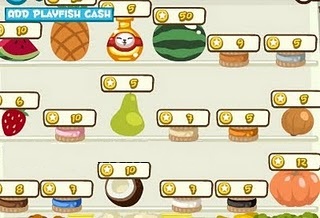
  7. Go into the Food Shop >  Grocery. Have fun buying the color dyes! You should see the image of the Instantgrowth and color dyes as shown below. If you do not, you have done something wrong, repeat from step1.

    Apple = Grey
    Banana = Pink
    Broccoli = Dark brown
    Carrot = Blue
    Cauliflower = Beige
    Corn = Black
    Courgette = White
    Grapes = Brown
    Leek = Orange
    Lemon = PetlingInstaGrowth
Note: There are WIG DYES TOO. So just explore the food shop :p

Pet Society - Mermaid Clothes Hack


Credit:janet, monet@pwnthis
Tools:
  • Firefox 3.5 (need to force traffic to firefox)
  • IE | Chrome
  • Fiddler [Link ] | [Link2 ]
  • FP10 - Flash Player 10
  • Databasmermaide & Actionmermaid[  Link1 / Link2 / Link3
Steps:
  1. Open Fiddler
  2. Go into Pet Society. Once loaded, find for these 2 lines in Fiddler.
  3. http://d2syub29v5lge2.cloudfront.net/game/pets/swf/xxx/database.dat
    and
    http://d2syub29v5lge2.cloudfront.net/game/pets/swf/xxx/actions.dat
  4. Right click them > Copy URL and go to Autoresponder and click 'Add'  Do it 1 line at a time.
  5. Now replace those files with the 2 files that you have just downloaded.
    databasemermaid > database.dat and  actionsmermaid > actions.dat
  6. Clear cache for your browser.
  7. Clear cache for your browser! i cannot emphasize this enough.
  8. Refresh Pet Society. The Mermaid Dress and Pin will appear.The wig is there but you cant see it yet.
  9. Just generate enough till you are happy. Close Fiddler. Refresh Pet Society and you can now see the Wig. have fun.

samedi 10 avril 2010

Pet Society - Cash Petlings hack


Credit:Nofil2000
Tools:
  • Firefox 3.5 (need to force traffic to firefox)
  • IE | Chrome
  • Fiddler [Link ] | [Link2 ]
  • FP10 - Flash Player 10
  • CashPetiling-hack-facebookhax-bynofill2000 [Link1 / Link2 / Link3 ]
Steps:
  1. Open Fiddler 
  2. Click 'Clear cache' if this is not your first time using Fiddler. Try to clear your browser cache too.
  3. Go into Pet Society
  4. In Fiddler, search(CTRL+F) for this line 'database.dat
  5. Right click this line, copy > just url
  6. Go to Autoresponder
  7. Click Add
  8. The url that you copied will appear.
  9. Now click on the arrow at the bottom besides the Save button
  10. Select 'Find a File' and browse for the database that you've just downloaded from me
    "CashPetlings-nofil2000.Dat"
  11. Click Save
  12. Click Clear Cache and refresh your Pet Society
  13. If done correctly, you should see The Cash Petlings(Tiger/Lamb) in Garden
  14. Buy an apple to grow your pet instantly. HAVE FUN!


Pet Society - New Comer items + Pet Graduate items / Extra


Credit:Nofil2000
Tools:
  • Firefox 3.5 (need to force traffic to firefox)
  • IE | Chrome
  • Fiddler [Link ] | [Link2 ]
  • FP10 - Flash Player 10
  • New Comer Pet Graduate Scroll Pet Graduate Doll [ Link1 / Link2 / Link3 ]
Steps:
  1. Open Fiddler 
  2. Click 'Clear cache' if this is not your first time using Fiddler. Try to clear your browser cache too.
  3. Go into Pet Society
  4. In Fiddler, search(CTRL+F) for this line 'actions.dat
  5. Right click this line, copy > just url
  6. Go to Autoresponder
  7. Click Add
  8. The url that you copied will appear.
  9. Now click on the arrow at the bottom besides the Save button
  10. Select 'Find a File' and browse for the database that you've just downloaded from me
    "NewComer.Dat"
  11. Click Save
  12. Click Clear Cache and refresh your Pet Society
  13. If done correctly, you should see a pile of Items each time you enter a room.

Pet Society - nannybot`s Battery hack

Credit: oldx3

Tools:
  • Firefox 3.5 (need to force traffic to firefox)
  • IE | Chrome
  • Fiddler [Link ] | [Link2 ]
  • FP10 - Flash Player 10
  • database.dat [ Link1 / Link2 / Link3 ]
Steps:
  1. Open fiddler. Clear your browser cache.
  2. Drag the "database.dat" into Fiddler Autoresponder
  3. Go into Pet Society.
  4. Go to the Food shop > Groceries.
  5. Purchase any of the 3 items
Note:The Batteries will become the fruits if you play without Fiddler. But the robot still activated and able to send to your friends. Watch Video for details.

Pet Society Future Items Preview – April 12, 2010


vendredi 9 avril 2010

Pet Society - Secret Room Hack


Credit:Avenger G0610@Pwn
Tools:
  • Firefox 3.5 (need to force traffic to firefox)
  • IE | Chrome
  • Fiddler [Link ] | [Link2 ]
  • FP10 - Flash Player 10 
  • petsociety-Secret room-hacks [ Link1 / Link2 / Link3 ]
Steps:
  1. Download The 'petsociety-Secret room-hacks' Above
  2. Open Fiddler
  3. Go into Pet Socity
  4. Go to the Food Shop and buy 'Pumpkin' and tree Seed
  5. Save Game. Clear Browser cache.
  6. In Fiddler, find the line 'database.dat'
  7. Or you can manually include this line in the autoresponder
    'regex:(?insx)^http://d2syub29v5lge2\.cloudfront\.net/game/pets/swf/.*/database\.dat$'
  8. Replace with xdatabase.dat that you have just downloaded
  9. Click Save.
  10. Refresh Pet Society
  11. Go to the Garden, plant your tree seed.
  12. Open your chest and find for the 'Pumpkin' You will see that it has changed into the Beanstalk fertilizer. (Note: You cannot search the item by typing 'pumpkin' Manually scroll through the list of items to find it.
  13. Drop it on the tree that you have planted. It will turn into a beanstalk and the secret room opens up. Have fun.

Pet Society - Coloured Wigs


Credits: Patiniox


Tools:

  • Firefox 3.5 (need to force traffic to firefox)
  • IE | Chrome
  • Fiddler [Link ] | [Link2 ]
  • FP10 - Flash Player 10
  • Wig Database [ Link1 / Link2 / Link3 ]


Steps:
  1. Open fiddler. Clear cache.
  2. Go into PS. There will be the line '/game/pets/swf/XXXX/database.dat' in Fiddler.
  3. Right click copy url. Add it in Autoresponder. If you cant find it, manually add it using this line. Make sure Enable Auto and Permit pass.. are both ticked.  
    regex:(?insx)^http://d2syub29v5lge2\.cloudfront\.net/game/pets/swf/.*/database\.dat$
  4. Replace the database.dat with the 1 that you have just downloaded from me
  5. Now go into Pet Society.
  6. Wear a Wig. (you can purchase 1 in the Clothes > Wigs)
  7. Go to the Food shop > Groceries.
  8. Purchase any of the following items and your wig will be Dyed that colour :p It's like buying a cheese to get white! hehe. Have fun experimenting.
    The FRUITS > COLOR list is in the folder. Just open info.txt and check the color that you want.

mardi 6 avril 2010

pet societ crazy coin hack v2

                                                             Credits: Yagami Fullelectronica


 tools
  • Fiddler
  • Any browser that works with Fiddler (i prefer firefox)
  • Flash 10
  • Winrar to extract the folder onto your desktop[click to download]
  • TreasureMagnet.dat [download1 | download2]
Steps:

  1. Download the TreasureMagnet.dat  above.
  2. Open Fiddler.
  3. Go to the Autoresponder tab. If you have been doing the latest coin cheat, you will already have this line "regex:(?insx)^http://d2syub29v5lge2\.cloudfront\.net/game/pets/swf/.*/actions\.dat$"  in the rule editor.
  4. If you do not, just add the line in.
  5. Select the dropdown arrow beside the Save button and browse to the TreasureMagnet.dat that you have downloaded in step 1. 
  6. Click Save.
  7. Clear cache in both fiddler and your browser
  8. Open Pet Society. 
  9. If done correctly, you should see a pile of Treasure Magnet Items each time you enter a room.

lundi 5 avril 2010

Pet Society // Treasure Magnet Items Cheat

Credits: Yagami Fullelectronica
 
  • Fiddler
  • Any browser that works with Fiddler (i prefer firefox)
  • Flash 10
  • Winrar to extract the folder onto your desktop[click to download]
  • File 1: Magic Sea Mirror, Sweet Mermaid Statue, Corals Decor, Sea Diamond [Download1 | Download 2]
  • File 2: Bubbles Volcano, Triton’s Trident, Sleepy Octopus, Sea Castle [Download1| Download2]
  • File 3: Silver Coin, Mermaid bear plushie, Golden coin, Deep sea golden heart [Download1|Download2]
Steps:
  1. Download the 3 Files above.
  2. Extract all the 3 folder out to your desktop. You will see an action.dat in each folder.
  3. Open Fiddler.
  4. Go to the Autoresponder tab. If you have been doing the latest coin cheat, you will already have this line “regex:(?insx)^http://d2syub29v5lge2\.cloudfront\.net/game/pets/swf/.*/actions\.dat$”  in the rule editor.
  5. If you do not, just add the line in.
  6. Select the dropdown arrow beside the Save button and browse to the action.dat that you have downloaded in step 1. 
  7. Click Save.
  8. Clear cache in both fiddler and your browser
  9. Open Pet Society. 
  10. If done correctly, you should see a pile of Treasure Magnet Items each time you enter a room. 
  11. Collect all the fishes the easy way!

Pet Society - All Fishes Cheat

Tools;
  • Firefox 3.5 (need to force traffic to firefox)
  • IE | Chrome
  • Fiddler [Link ] | [Link2 ]
  • FP10 - Flash Player 10
  • PSfishes.xml.Dat [Link1 / Link2 / Link3]
Steps:
  1. Download the PSfishes.xml.Dat file above.
  2. Open Fiddler.
  3. Go to the Autoresponder tab. If you have been doing the latest coin cheat, you will already have this line "regex:(?insx)^http://d2syub29v5lge2\.cloudfront\.net/game/pets/swf/.*/actions\.dat$"  in the rule editor.
  4. If you do not, just add the line in.
  5. Select the dropdown arrow beside the Save button and browser to the PSfishes.xml.dat that you have downloaded in step 1. 
  6. Click Save.
  7. Clear cache in both fiddler and your browser
  8. Open Pet Society. 
  9. If done correctly, you should see a pile of coins+cash fishes each time you enter a room. 
  10. Collect all the fishes the easy way!

dimanche 4 avril 2010

Pet Society - Treasure items Cheat

Credit:Karim@facebookhax
&
MadEvil 4 steps
Tools:
  • Firefox 3.5 (need to force traffic to firefox)
  • IE | Chrome
  • Fiddler [Link ] | [Link2 ]
  • FP10 - Flash Player 10
  • Treasure items - Link1 / Link2
Steps:
  1. Open Fiddler
  2. Go into Pet Society
  3. Go back in Fiddler then find the "Action.Dat"
  4. Right click this line, copy > just url
  5. Go to Autoresponder (Tick both 'Enable Automatic responses' & 'Permit passthrough...')
  6. Click Add
  7. The url that you copied will appear.
  8. Now click on the arrow at the bottom besides the Save button. See image below
     
  9. Choose 1 item
  10. Put this Code 'regex:(?insx)^http://d2syub29v5lge2\.cloudfront\.net/game/pets/swf/.*/actions\.dat$' Under the 'Rule Editor'
  11. Click Save
  12. Now refresh your Pet Society
  13. Completed!(You Should See the item inside your room ) Have Fun!

samedi 3 avril 2010

Pet Society - Super Crazy coins cheat by Patiniox


Pet society - Latest MB items // April 2, 2010


Tools:
  • MB items  [Link1 | Link2]
  • Firefox 3.5 (need to force traffic to firefox)
  • IE | Chrome
  • Fiddler [Link ] | [Link2 ]
  • FP10 - Flash Player 10
Steps:
  1. Open Fiddler
  2. Click 'Clear cache' in Fiddler. Try to clear your browser cache too
  3. Go into Pet Society
  4. In Fiddler, search for this line '/game/pets/swf/X.X.X/shops/shopFoodXXXX.dat  (the X are digits that changes every update)
  5. Right click this line, copy > just url
  6. Go to Autoresponder (Tick both 'Enable Automatic responses' & 'Permit passthrough...')
  7. Click Add
  8. The url that you copied will appear.
  9. Now click on the arrow at the bottom besides the Save button. See image below
  10. Select 'Find a File' and browse for the database that you've just downloaded from me "ShopFood-facebookhaxMB.xml.Dat"
  11. Click Save
  12. Click Clear Cache and refresh your Pet Society
  13. Enter the Food Shop, Click GROCERY tab at the bottom   and you should see all the Cash Flowers. Enjoy
Note: Do NOT buy the Hotel City plushie as mayor will appear. buy only the MB items.